CloudLibrary
- 4.7
- Rating
- 1.00M
- Installs
- Free
- Price

 Analysis by App-foxy
I approached CloudLibrary as a reader who wants library borrowing to feel as convenient as buying or downloading a book, but without giving up the library connection. Developed by OCLC, this free Books & Reference app is designed for borrowing and reading eBooks and audiobooks through participating libraries. That last point matters: it is not a general-purpose bookshop or an unlimited reading subscription. Its usefulness depends on whether your library supports the service and what that library makes available.
My overall impression is positive. The app makes digital borrowing feel more approachable than visiting several separate library websites, and it can be especially helpful for people who find printed books difficult to carry, hold, or read for long periods. At the same time, the experience is not equally smooth for every reader. Library availability, title access, device comfort, and the way a person interacts with screens or audio all affect whether it becomes a daily reading tool or merely an occasional convenience.
How CloudLibrary supports different ways of reading
I find the most useful way to judge CloudLibrary is to look at how its borrowed books can fit different reading situations, rather than expecting one format to work everywhere. In the next section, I’ll focus on the practical choices that shape a comfortable session and why planning around your setting can make borrowing feel less disruptive.
You May Also Like

 Blood Strike: 2.5 Anniversary
Blood Strike’s Loadouts Turn Every Drop Into a Tactical Gamble
A close look at Blood Strike’s custom loadouts: how fast access to signature weapons reshapes its battle royale rhythm, rewards preparation, and narrows the gap between fights.

 Pandora - Music & Podcasts
Pandora’s Music Is Easy to Start, but Harder to Recover
Pandora’s strength is its low-effort path from a seed to a station. Its weak spot is how much confidence it asks you to place in connection, setup, and quiet recovery.

 8 Ball Pool
 Is Built on Rivalries, Rematches, and Routine
A close look at the rivalries, rematches, shared routines, and unanswered safety questions that turn a quick pool match into a persistent mobile community.

 Samsung Music
’s Quiet Strength Is Playing What You Already Own
Its reach comes less from spectacle than from dependable access to a personal library. That simplicity is both the app’s strongest retention engine and its ceiling.

 AccuWeather: Weather Radar
AccuWeather Review: A Quick, Clear Forecast for Everyday Decisions
For everyday plans, the best forecast is the one you can understand quickly. AccuWeather makes rain timing, radar, and local conditions easy to act on, with a few trade-offs.

 Hill Climb Racing
Why Hill Climb Racing Still Turns Crashes Into One More Run
A tiny car, a bumpy hill and one more upgrade: Hill Climb Racing keeps resurfacing because its simple chaos makes every near-miss feel personal.
More From Our News Desk



Readability starts with a simple borrowing purpose
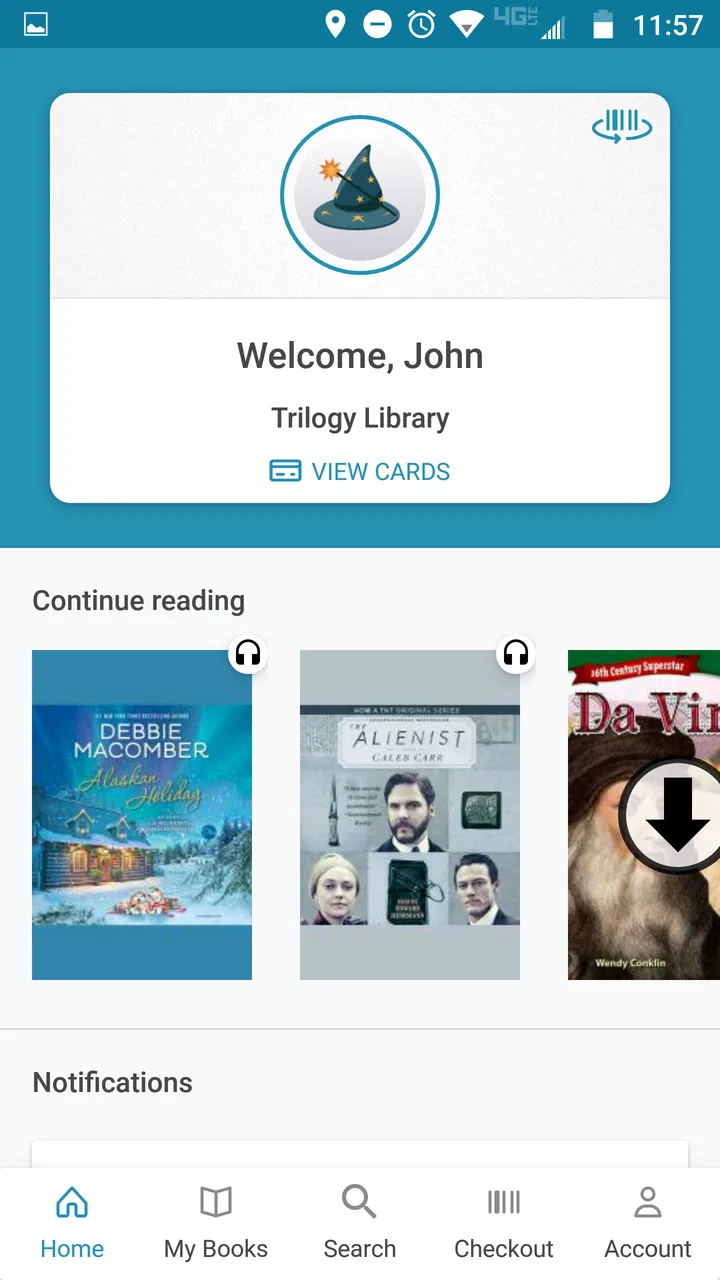
The clearest strength is that CloudLibrary has a focused job. I open it to look for library eBooks or audiobooks, rather than sorting through a mixture of retail recommendations, social updates, and unrelated media. That narrow purpose can reduce mental effort for someone who wants a straightforward route from library catalogue to reading.
The app belongs in the same practical space as other digital library services, but the comparison with ordinary alternatives is important. A commercial eBook store is usually better when I want immediate ownership or a title that is not held by my library. A subscription reading service may offer a broader catalogue under one recurring plan. CloudLibrary is different: it is most attractive when I already use a participating library and want to borrow rather than purchase.
For a reader who becomes overwhelmed by crowded interfaces, this distinction can be useful. I can think in library terms: search for a title, check whether it is available, borrow it, and read or listen. That workflow is easier to understand than an app that mixes free samples, purchases, subscriptions, and borrowed items without a clear separation.
There is also a useful mental shift here. A digital loan is temporary, so I do not have to decide whether a book deserves permanent space on my device. That can make it easier to explore unfamiliar authors or subjects. For someone with limited attention or energy, borrowing a single relevant title may feel more manageable than browsing an enormous commercial catalogue.
Text and audio serve different reading needs
The combination of eBooks and audiobooks gives CloudLibrary more flexibility than a text-only borrowing app. I might read a few pages during a quiet break, then switch to an audiobook while doing a household task or travelling. This is not just a convenience for busy people; it also gives readers another route into content when sustained visual reading is tiring.
For people who experience eye strain, dyslexia, fluctuating concentration, or difficulty maintaining a comfortable reading posture, audiobooks can change the experience considerably. They do not solve every access problem, of course. Listening requires a suitable environment and enough concentration to follow the narration, while reading may be preferable when I need to scan, reread, or consult a particular passage.
I found the strongest use case in treating the two formats as complementary rather than interchangeable. I might use an eBook for reference material because visual scanning is faster, then choose audio for a novel. A reader who assumes the app is only for conventional reading may miss this practical advantage.
Navigation is clearest when I plan before opening a title
One habit makes the service easier to use: I search with a specific goal instead of browsing indefinitely. If I know the author, title, or subject I want, the library-focused workflow feels direct. If I am only looking for “something interesting,” the experience becomes more dependent on the catalogue organization and the individual library’s collection.
This is a meaningful accessibility consideration because open-ended browsing can be tiring for people who have difficulty making choices. A short list prepared elsewhere, such as a note with several authors or topics, can turn the app into a more predictable tool. I also prefer checking whether a title is available before settling into a reading plan; a popular book may require waiting, and that can disrupt a carefully timed routine.
The app’s average rating is 4.7 from around 54 thousand ratings, with more than a million installs, which suggests that many readers find the basic experience worthwhile. I would not treat those figures as a guarantee for every person, though. A high overall rating cannot account for differences between library collections, phones, hearing needs, visual preferences, or comfort with digital borrowing.
Motor interaction and device comfort
Digital reading can remove some physical barriers associated with print. I do not need to hold a heavy hardcover open, turn thick pages, or carry several books in a bag. Someone with reduced hand strength may appreciate being able to read from a supported phone or tablet instead of balancing a physical volume. Audiobooks can reduce the need for continuous touch interaction during the listening portion.
That benefit depends on the device setup. A small phone screen may require frequent scrolling or repositioning, which can be uncomfortable for someone with limited dexterity or joint pain. A larger screen can make text easier to follow, but it may be heavier to hold. In practice, a stand or stable surface can matter as much as the app itself. I would place the device at a comfortable angle rather than gripping it throughout a long session.
Readers who use touch controls carefully should also think about the difference between reading and listening. Reading usually involves more repeated visual and physical interaction, while audio may allow a simpler start-and-listen routine once the title is prepared. However, audio still requires controls for pausing, resuming, or moving through content, so it is not automatically effortless for every motor situation.
My advice is to build a low-effort routine around the app: choose the book while you have time, prepare the device on a stable surface, and avoid making every session depend on repeated searching. This is a small change, but it reduces the number of taps and decisions needed when energy or hand control is limited.
Sensory context changes the best format
CloudLibrary can fit different sensory environments because it offers both visual and audio content, but the right choice changes from moment to moment. In a bright room, visual reading may be comfortable; in a noisy place, an audiobook may be harder to follow. Conversely, audio can be useful when lighting is poor, while text may be better when I need quiet concentration.
For readers sensitive to sound, an audiobook is not automatically the better option. Background noise, narration style, and the need to maintain auditory attention can become tiring. I would test a short listening session before choosing audio for a long journey or an important book. Text remains valuable for people who prefer silence or who process written information more reliably.
For readers with visual differences, the practical question is not simply whether an eBook exists. It is whether the chosen screen, text presentation, brightness, and viewing distance create a comfortable experience. CloudLibrary is useful as part of that setup, but the phone or tablet remains a major part of the accessibility equation. I would not judge the app in isolation from the device on which it is used.
Everyday situations where the app makes sense
Imagine a commuter who has a library card, carries only a phone, and has twenty minutes before work. With CloudLibrary, that person can look for an available eBook instead of making a separate trip to the library. On another day, the same reader could choose an audiobook for the journey and reserve visual reading for home. The value is not that the app removes every step; it is that borrowing can fit around an existing routine.
Another realistic case is a reader recovering from an injury who does not want to hold a large book. An audiobook may provide access without the same physical demand, while a digital text can be read on a supported screen in short sessions. The app becomes most helpful when the reader treats format choice as part of managing energy, posture, and concentration rather than as a permanent preference.
It can also help families or households that share limited physical space. Borrowing digitally avoids adding another printed volume to a crowded room, and an audiobook can be used when someone cannot comfortably sit down with a book. Still, each person should choose according to their own library access and device comfort; the app does not turn every title into an instantly available shared resource.
Where the experience still creates friction
The biggest limitation is the library relationship. CloudLibrary is not equally useful everywhere, because the catalogue and borrowing conditions come from participating libraries. If my library does not support it, or if its collection is small in the subjects I care about, the app cannot compensate with a universal catalogue. This is the first question I would settle before investing time in organizing my reading around it.
Availability can also interrupt the reading experience. A title may be discoverable but unavailable at the moment I want it, which is very different from a retail purchase or a service built around immediate access. For readers who need a book for a class, a deadline, or a planned trip, I would check availability early and keep an alternative title ready.
The temporary nature of borrowing may be inconvenient for people who want permanent access. CloudLibrary suits readers who are comfortable returning books and adapting to loan periods. It is less suitable for someone who annotates the same reference book over many years, collects personal copies, or needs guaranteed access without depending on a library loan.
There is also a difference between digital convenience and digital simplicity. A person who is already comfortable with library accounts, eBook borrowing, and switching between reading and audio will likely settle in quickly. Someone who finds account steps, catalogue terminology, or changing formats confusing may need patience at the beginning. I would recommend starting with one short book rather than attempting to build a large queue immediately.
Who should choose it, and who should look elsewhere
I would recommend CloudLibrary to library users who want a free way to borrow eBooks and audiobooks, especially those who move between reading contexts. It is a strong match for people who dislike carrying books, need audio as an alternative to visual reading, or want to make use of a library collection outside normal opening hours.
It is also a sensible option for readers who prefer borrowing to buying. The absence of a purchase price makes experimentation easier, and the app’s Everyone content rating makes it broadly approachable for general audiences. The developer, OCLC, is closely associated with library technology, which fits the app’s purpose and distinguishes it from commercial reading platforms.
I would look elsewhere when immediate ownership matters, when a specific title must be available on demand, or when my library’s digital catalogue does not match my interests. A retail reader may be better for permanent purchases, while another library app may be preferable if my local library uses a different service. For people who need highly specialized reading controls, I would also test the complete experience on their own device rather than assuming that a library-focused app will meet every need.
My inclusive verdict
CloudLibrary is at its best when it gives a reader more than one practical route to library content. Text and audio support different energy levels, environments, and physical situations, while digital borrowing reduces the burden of carrying and storing print books. Those strengths make it more inclusive in everyday use, even though the experience still depends heavily on the library catalogue and the reader’s device.
The current version is 5.15.0.4 and requires an operating system version of 10 or later, so I would check device compatibility before planning around it. The app has been available since October 4, 2011, and its long presence alongside strong user feedback suggests an established service rather than a short-lived experiment. Still, longevity does not remove the need to test whether the particular library and device combination works well for me.
My final recommendation is practical: confirm that your library participates, search for a title you genuinely want, and try both an eBook and an audiobook if both are available. Pay attention to how much effort each format requires, not just whether the app opens successfully. The best reason to use CloudLibrary is the freedom to match library borrowing with the way you can comfortably read today. If that combination fits your routine, this free app is a thoughtful and useful addition to a digital reading setup; if you need permanent ownership or guaranteed access, a different option will serve you better.
FAQs for CloudLibrary
01What is CloudLibrary and what features does it offer?
CloudLibrary is a digital library app that provides access to a wide range of eBooks and audiobooks. Users can borrow digital content from their local library, customize their reading experience, and explore personalized recommendations. It supports cross-device syncing, allowing seamless transitions between reading on phones, tablets, or computers.
02Is CloudLibrary free to use, or are there any hidden costs?
CloudLibrary itself is free to download and use. However, access to content depends on your local library's participation and any associated membership fees. Some libraries might require a library card or membership to borrow books. It's best to check with your local library for any specific costs or requirements.
03Can I use CloudLibrary without an internet connection?
Yes, you can use CloudLibrary offline by downloading eBooks or audiobooks to your device. Once downloaded, you can read or listen to them without an internet connection. This feature is particularly useful for users who want to enjoy content on the go or in areas with limited connectivity.
04Is CloudLibrary available on all devices?
CloudLibrary is available on both Android and iOS devices, as well as on Windows and Mac computers. It supports a wide range of devices, ensuring accessibility for most users. The app allows for easy syncing, so you can start reading on one device and continue on another without losing your place.
05How can I get support if I encounter issues with CloudLibrary?
If you encounter any issues with CloudLibrary, you can access the in-app help section for troubleshooting tips. Additionally, the app's website provides a comprehensive FAQ and support section. For more personalized assistance, contacting your local library or CloudLibrary's customer support directly can help resolve specific problems.
Pros
- User-friendly interface for easy navigation.
- Wide selection of e-books and audiobooks.
- Seamless syncing across multiple devices.
- Offline reading mode available.
- Regular updates with new features.
Cons
- Limited customization options for reading.
- Requires library card for full access.
- Occasional app crashes reported.
- Some titles may not be available.
- No support for Kindle devices.

CloudLibrary
Gallery